Ticket System
Requests from email in one place, with states, assignees and time tracking
Contact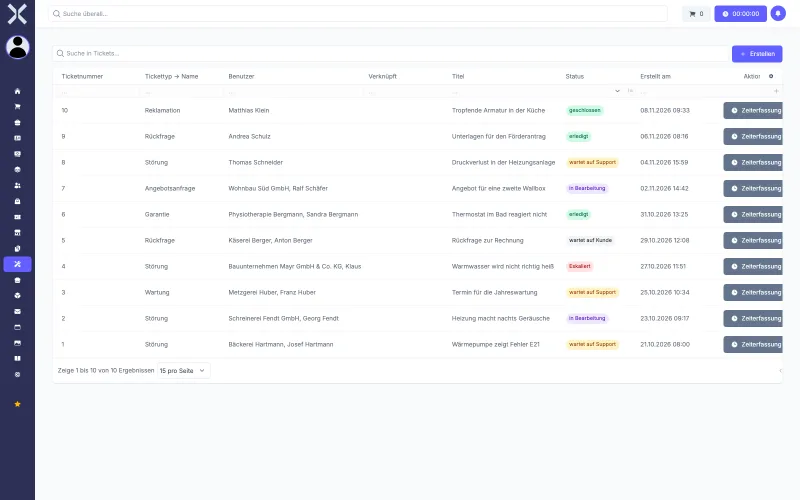
What the ticket system in Nuxbe does
The ticket system in Nuxbe collects requests from customers and colleagues in one place. Tickets are created from emails arriving in a mailbox folder set up for it, or entered by hand. Every ticket belongs to a contact and has a state, one or more assignees and a history of internal and public comments.
Because tickets live in the ERP, everything that belongs to the customer sits next to the request: orders, invoices, projects and earlier tickets. The time a ticket takes is tracked right on it and can be billed.
What the module does in detail
Creating tickets
- Tickets created automatically from an email folder
- Replies to a notification are added as a comment to the same ticket
- Automatic acknowledgement with your own template
- Tickets created by hand or through the REST API
- Ticket types for classification
Working on tickets
- States waiting for support, waiting for customer, in progress, escalated, done and closed
- Several assignees per ticket
- Internal comments for the team only, public comments for the customer
- Mentions of colleagues in comments
- Notifications on new tickets, assignment and changes
Time and reporting
- Time tracking on the ticket, optionally flagged as billable
- The time of resolution is stored
- Response time widget on the dashboard
- Activity log for every ticket
Keeping knowledge
What support is asked again and again belongs in a knowledge base. The Knowledge Base add-on package provides articles with categories and permissions that the team can search.
A ticket from arrival to closing
A customer writes to your support address. The email arrives in the connected mailbox, Nuxbe turns it into a ticket and sends the acknowledgement from your template.
A colleague takes the ticket. Questions for the team go into an internal comment that mentions the colleague who knows the answer. The reply to the customer is a public comment, and while the customer has to respond, the ticket waits in the state waiting for customer.
When the customer replies to the notification, the email is added as a comment to the same ticket. The colleague tracks the time the request took right on the ticket. Once it is solved, she sets the ticket to done, and billable time goes into the invoice later together with all other time entries.
Where the module stops
The ticket system has no priorities, no SLA deadlines and no rules for automatic assignment. Who works on a ticket is set by hand. Ticket types classify tickets and bring no fields of their own.
Frequently asked questions
- How are tickets created from emails?
- You connect a mailbox over IMAP and mark a folder that tickets should be created from. Every new email there becomes a ticket. Replies to a ticket's notifications are added as comments to the existing ticket.
- Does the customer see internal notes?
- No. Comments are either internal or public, and only public comments reach the customer.
- Can I bill support time?
- Yes. Time is tracked directly on the ticket, can be flagged as billable and turned into orders.
- Are there SLA deadlines and priorities?
- No. Tickets are steered through states and assignees. A widget shows response times.
- Is there a knowledge base?
- Yes, as the Knowledge Base add-on package with articles, categories and permissions that the team can search.
Improve Your Support
See how Nuxbe can help you deliver better customer service